





INTRODUCTION
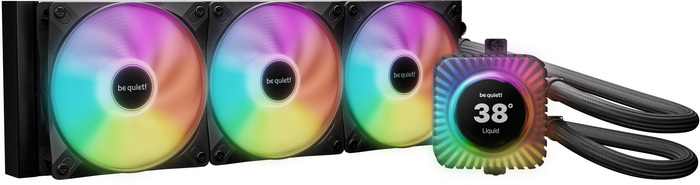
CPUs run hotter than ever these days, and keeping them cool isn’t just about avoiding throttling, it’s about keeping your system quiet and stable when you’re gaming, editing, or just pushing your machine a bit. That’s why so many builders lean toward AIO liquid coolers, they’re tidy, they look great, they are easy to install and they handle heat far better than most air coolers when things get intense. And if you want the strongest cooling without going custom loop, a 360mm AIO is usually the sweet spot. That’s exactly where be quiet!’s new Light Loop IO LCD 360mm fits in, bringing the company’s signature low‑noise approach together with a fresh lighting design.
We are the German premium brand manufacturer of quiet hardware components for gaming, workstations and desktop PCs. Since our foundation in 2001, we are proud to have more than 20 years of experience in the industry. Our goal from the very beginning has been to develop products of the highest quality that are not only quiet, but also extremely powerful. With a wide range of power supplies, PC cases, water and air coolers and fans, we have established ourselves as a leading manufacturer in this field.
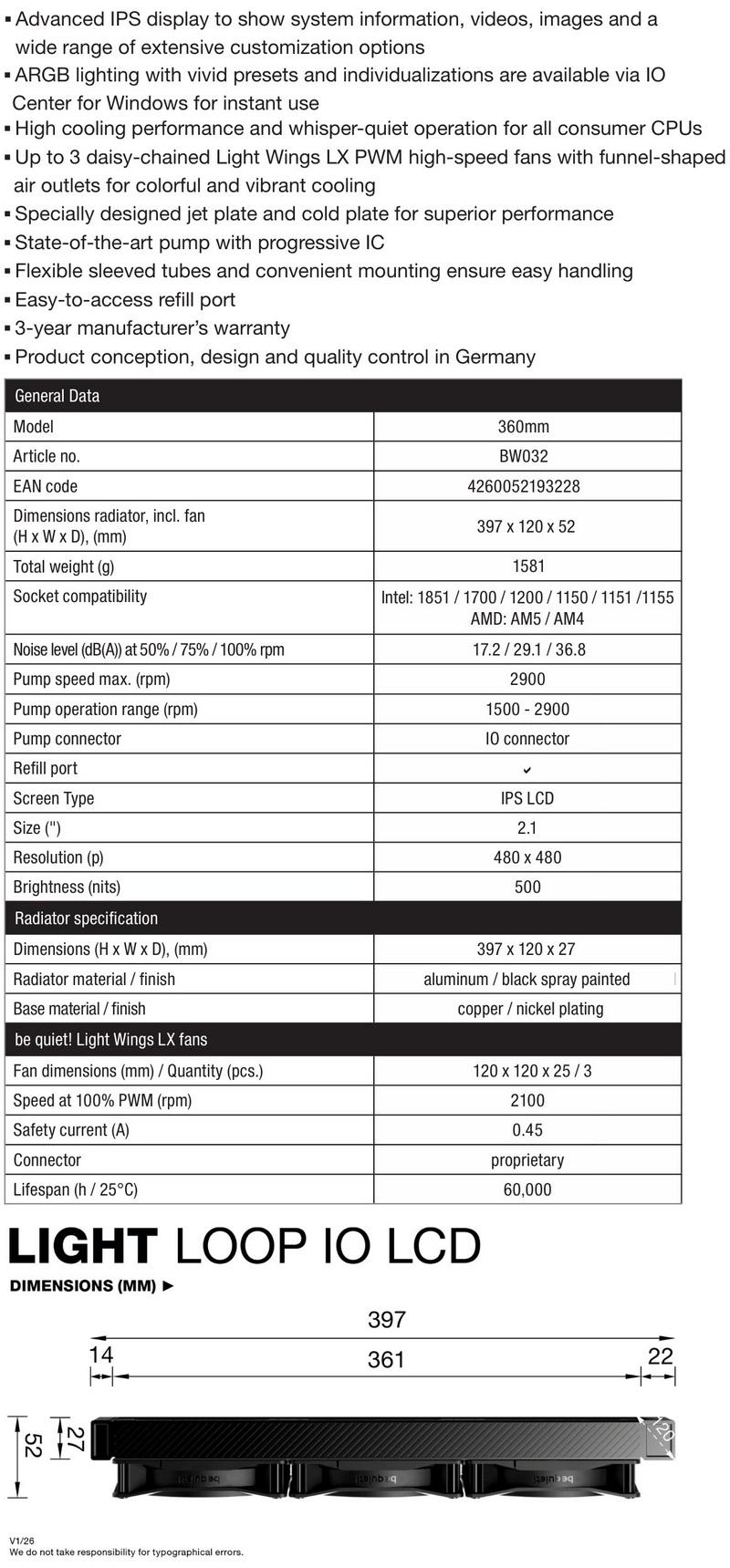
The Light Loop IO LCD (available in black and white) is be quiet!’s most feature‑rich AIO to date, built around a genuinely modern hardware stack rather than a cosmetic refresh. At its core sits a newly engineered pump with a progressive IC and a 1500–2900RPM operating range, paired with a redesigned jet plate and cold plate that push thermal efficiency beyond previous generations. The radiator itself is a full‑size 397x120x27mm aluminum unit finished in black, fed by flexible sleeved tubing and supported by an easy‑access refill port, something you rarely see in mainstream AIOs. Cooling performance is driven by three Light Wings LX 120mm PWM high‑speed rifle-bearing ARGB fans (2100RPM/61.8CFM/2.51mmH2O/30.9dBA - 16 ARGB LEDs each) with funnel‑shaped outlets for stronger pressure and more vibrant ARGB diffusion. The standout feature, though, is the new 2.1" IPS LCD display, a 480x480p panel hitting 500nits, capable of showing system stats, images, videos, and fully customized presets through be quiet!'s IO Center. With AM5/AM4 and full Intel support up to LGA1851, plus a 3‑year warranty and German‑led design and QC, the Light Loop IO LCD 360mm lands as a premium AIO water cooler aimed squarely at high‑power CPUs.
SPECIFICATIONS AND FEATURES
PACKAGING AND CONTENTS

Once again be quiet! has used a black box the front of which is taken by their logo and a product picture.

A 2D barcode is available on the left side (takes you to the product page).

At the rear we find 3 product pictures used to showcase the main features.

Typically, the AIO is placed inside a formed piece of cardboard.

Along with the Light Loop IO LCD AIO and its 3 Light Wings LX 120mm ARGB fans inside the box be quiet! has also placed a coolant bottle, thermal paste tube, IO controller, two refill port stickers, 3 cable ties, fan to ARGB/4pin adapter, warranty information paper, user manual and all the hardware needed to install it onto Intel LGA1150/1151/1155/1200/1700/1851 and AMD AM4/AM5 motherboards.
THE LIGHT LOOP IO LCD 360mm

AIO design hasn't change a lot over the years but the pump/waterblock/LCD combo of the Light Loop IO LCD certainly stands out.

The radiator without the fans mounted measures 27mm in thickness.

As expected, the fill port is located at the front of the AIO and is covered by a black sticker.

There's still an empty port right next to the base of the tubes which however is never meant to be used.

This aluminum radiator has an FPI (fins per inch) count of 19.

Along with the 400mm long sleeved tubes we also see a power cable running through one of them (for the daisy chained fans).

The 2.1-inch IPS display also has several ARGB LEDs surrounding it.

Here you can see an exposed view of the pump/waterblock/display combo (marketing material).

As always, the tubes can rotate from the base of the pump up to around 90 degrees.

The copper waterblock is nickel plated as seen above.

Instead of having 3 cables (ARGB header, 4pin fan header and SATA power) running from the pump be quiet! ships the Light Loop IO series with the IO controller which connects only via a USB-C cable (you still need to plug those cables to your motherboard however).

Each Light Wings LX 120mm fan has a total of 16 ARGB LEDs and can spin up to 2100RPM to produce up to 61.8CFM of airflow and up to 2.51mmH2O of air pressure with just 30.9dBA of noise.

With the Light Wings LX 120mm ARGB fans installed radiator thickness increases to 52mm.
INSTALLATION

360mm AIO are the standard nowadays so mounting the radiator is very easy.

After the radiator you will need to place the backplate at the rear of the motherboard and secure it with the bundled thumbscrews.

After that you will need to mount the metal brackets as seen above.

As you can all see the waterblock/pump/LCD combo of the Light Loop IO LCD is quite large (63.8x61.9x54mm) but also a lot smaller than any air cooler.


The Light Loop IO LCD display looks great and as you will see later on it’s also very adjustable (quick video showcasing the display is as always available both on TikTok and YouTube).
IO CENTER
For complete control over the Light Loop IO series, you will need to either install the IO Center software or run the online version directly from the be quiet! website (I strongly recommend the former).

Once run the software detects all compatible devices (left side) and also acts as a system monitor (right side).

Placing the mouse cursor over the picture of the product unveils all available tabs.


From the illumination tab you can pick one of the 6 available effects, group all zones together or adjust each one separately and you can even adjust each ARGB LED individually.

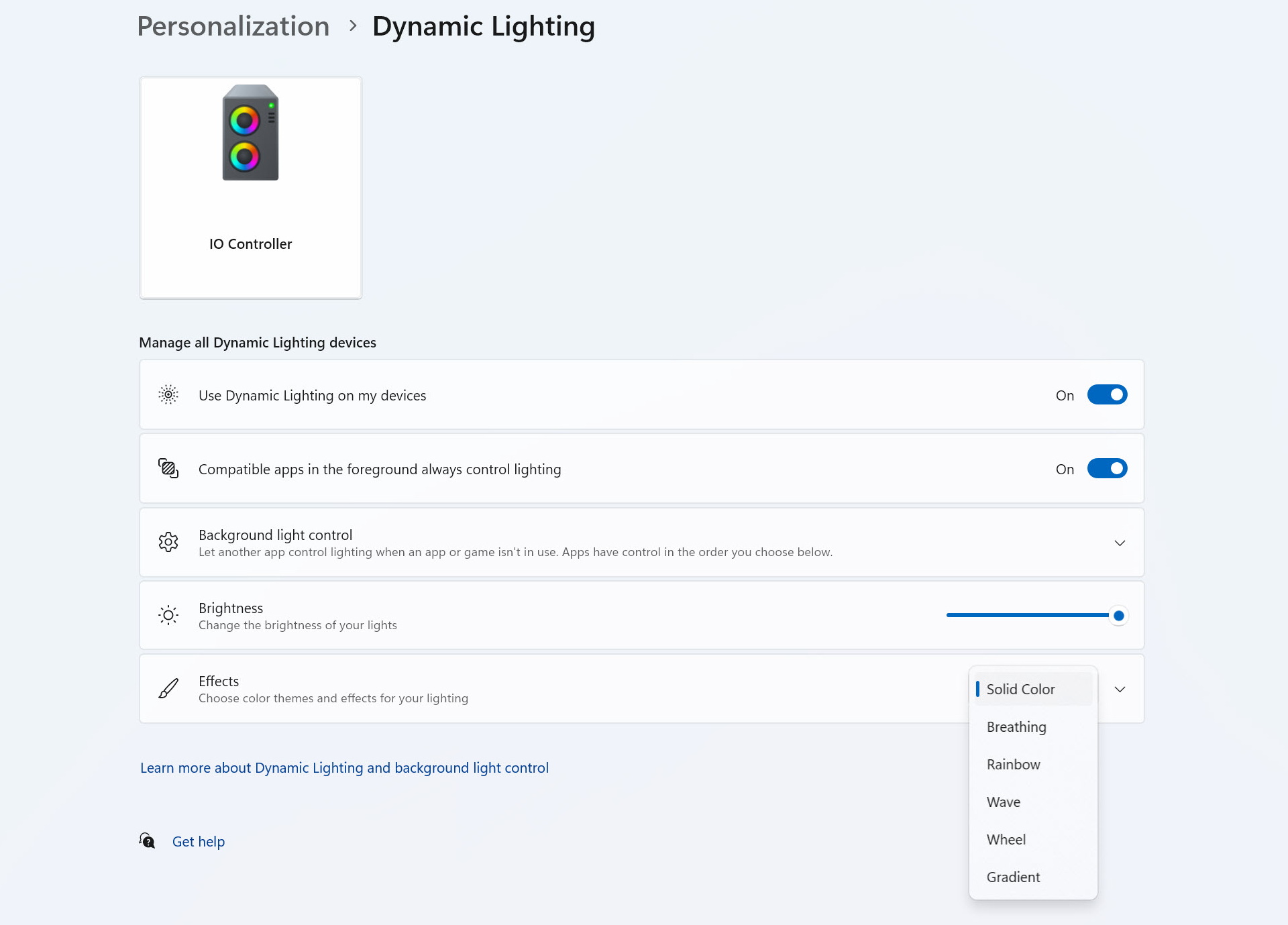
Microsoft dynamic lighting is something I've actually not used to date but that option is also available here.


From the screen tab you can choose a color, image, video/gif or dynamic ARGB effect and of course you can also upload your very own video/gif/picture (size limits apply).

The cooling setup tab is a bit confusing so if you don't want to get into fan curves, I suggest allowing your motherboard to do all the work (PWM connection).


If you want to get into it yourself however you have 3 available options, the general tab from where you can choose cooling modes (quiet/performance), the PID tab from where the AIO works based on your desired temperature and the cooling studio in which you also get the full speed option.

From the settings tab you can check for new firmware updates, calibrate the display (if needed), rotate the display and reset the entire device to its factory state.
TEST BED

TESTING METHODOLOGY
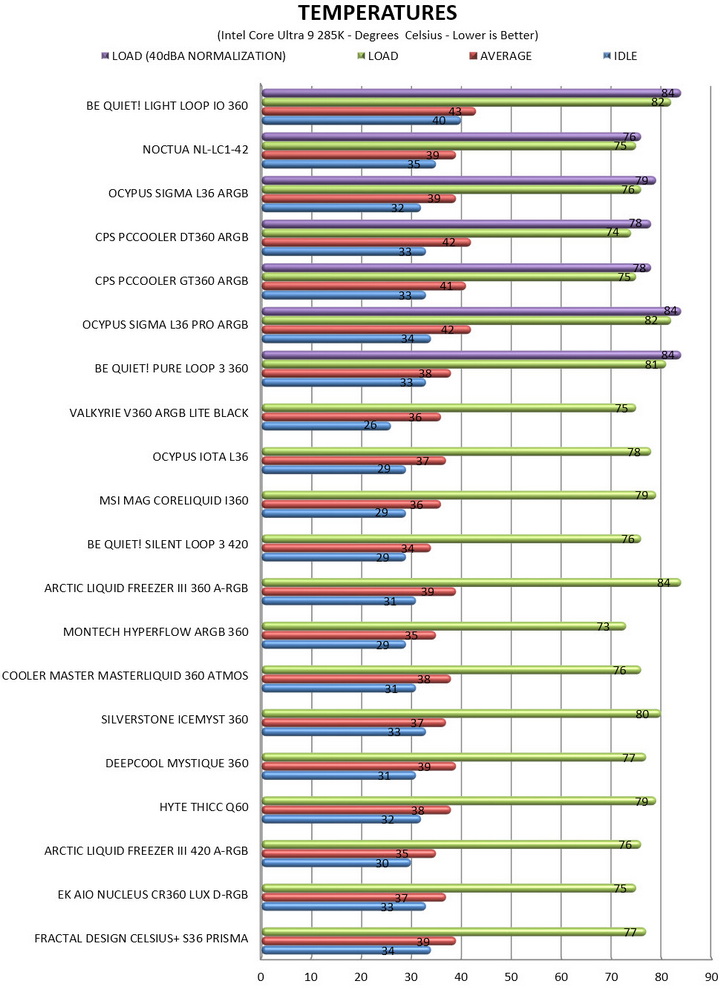
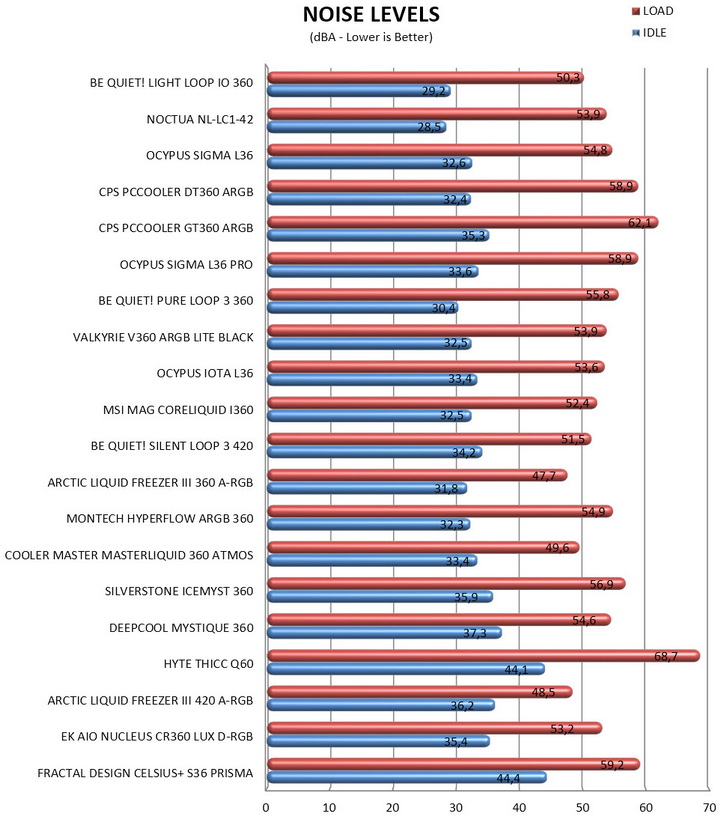
Testing complete water-cooling kits or individual radiators is no different than testing CPU Coolers and since we want all of you to be able to compare similar products, we created new and separate charts (you can still cross-compare results however since we are using the same test rig). So once again single (120/140mm) watercooling solutions are tested with the radiator mounted at the rear of our test rig while dual/triple/quad (240/260/280/360/420/480/560mm) solutions with the radiator mounted at the top. For the dBA tests complete water-cooling kits or radiators with bundled fans are measured both while on idle mode or with the fan controller in the minimum setting and while on extreme load or with the fan controller all the way to the highest possible setting (PWM fans do that on their own without our intervention). Every single test takes place in a temperature-controlled room of 23 degrees Celsius Ambient Temp with the help of two AC units placed diagonally inside the room and as for thermal paste I’m using the NT-H2 by Noctua. Finally, much like when testing CPU Coolers, it's very important to point out that just because a water-cooling kit (or an AIO) outperforms another when tested with our test rig (when we test complete water-cooling kits) that does not necessarily mean that the same performance differences will apply 100% for other CPU models and in other situations (such as different ambient temps and system configurations).
To successfully record the load temperatures, we use the latest OCCT application for around 6-10 minutes to push the processor to its limits and after that is done and the temperatures are recorded, we wait for about 10-20 minutes for the CPU to cool down and record idle temperatures. This is done to allow time for the thermal conductive material to achieve the optimal performance level. Same procedure is then repeated with the Passmark BurnIn Test as a failsafe just in case the OCCT results are wrong. This procedure takes a lot more time than the usual peltier/thermometer tests, but this way not only can we deliver real world results to our readers based on real CPUs, but we can also triple check the results using a variety of programs. Last but not least the temperatures were recorded using the latest version of AIDA64 while noise level tests (when fans exist in the bundle) are performed using a high precision ExTech HD600 Decibel Meter placed about 10-15cm above the radiator. Still although the same testing procedure applies to all units do take into consideration that unlike the official numbers which are measured in special noise isolated labs with just the fans here, we also have both the rest of the cooler and the rest of the system (although all system fans are turned off when recording noise levels).
* Since some manufacturers have ceased support for the Intel LGA 2011-3 platform, for such coolers, I’ll be using the Ryzen 7900X / ASRock X670E test rig.
** After high demand since September 2024, I’ll be including average temperatures in my AMD Ryzen 9 7900Χ/Χ670Ε charts (under light load such as Internet browsing and Office use).
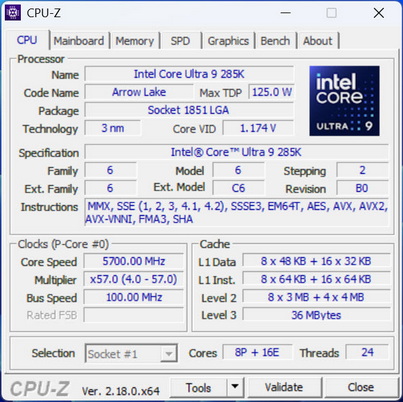
*** Since November 2024 I swapped test systems with the Intel Core Ultra 285K (same methodology as with the AMD Ryzen 9 7900X).
**** Following numerous reader requests from July 2026, I’ve added a load‑temperature test conducted with fan noise normalized to 40 dBA.
TEST RESULTS
CONCLUSION
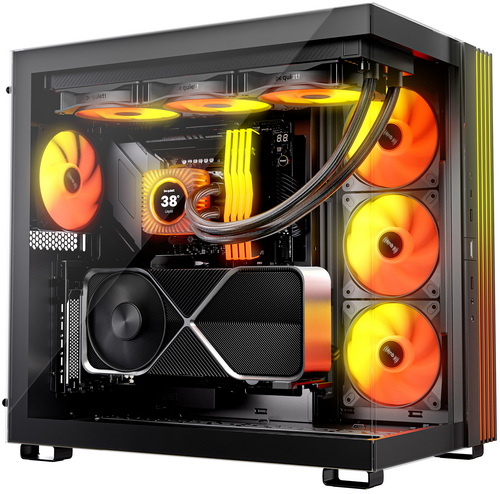
The be quiet! Light Loop IO LCD 360 combines a capable thermal design with standout user‑facing features. The three Light Wings LX fans contribute more than just aesthetics, their funnel‑shaped outlets and 2100RPM ceiling give the radiator consistent airflow, while the ARGB diffusion stays smooth and uniform. The 2.1-inch IPS LCD is equally purposeful, offering a sharp 480x480p resolution and 500‑nit brightness that makes telemetry, animations, and custom visuals stand out without feeling gimmicky. IO Center ties these elements together with a control suite that’s stable, lightweight, and far easier to navigate than many competing ecosystems. Thermal performance remains competitive thanks to the progressive‑IC pump and optimized cold‑plate geometry, delivering reliable cooling under sustained load. The only notable limitation is that noise‑normalized results reveal a small gap compared to the most performance‑driven 360mm units, strong, but not chart‑topping. Even with that caveat, the Light Loop IO LCD 360’s blend of engineering refinement, display functionality, and software usability makes it a compelling option for builders who want more than just raw cooling numbers.
The Light Loop IO LCD series of AIO by be quiet! launches today with a price tag of 218.72Euros inside the EU (Amazon.de) for the 360mm size model. This places the Light Loop IO LCD 360mm between several high-end models by the competition but regardless, it’s a tad higher than expected. Cost aside however the be quiet! Light Loop IO LCD 360mm delivers on everything from performance and low noise levels (it's clear that be quiet! focused especially on this) to build quality and looks and that’s why it gets the Golden Award.

PROS
- Build Quality
- Good Cooling Efficiency
- Low Noise Levels
- 2.1” IPS Display (480x480p)
- ARGB Lighting
- Motherboard Compatibility
- IO Center Controller & Software
- Available In Black & White Colors
CONS
- Price (For Some)
- Current USA Availability





