


INTRODUCTION
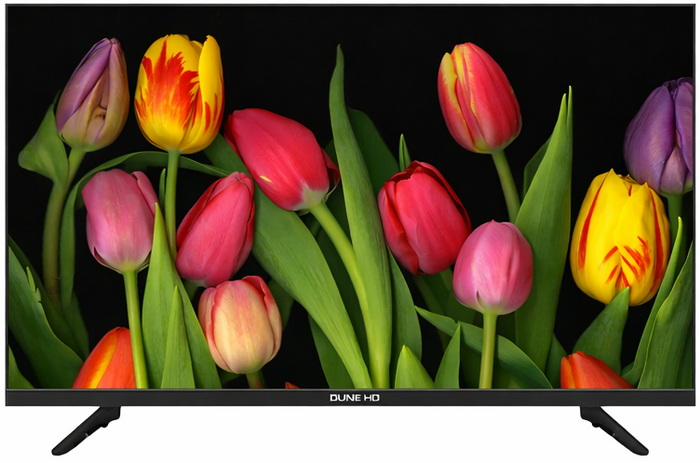
Smart TVs have become the default living‑room hub, not because they’re flashy (well, some are), but because they quietly centralize everything from streaming and casting to local playback and even light gaming. The real shift is that a TV is no longer just a panel, it’s an operating system with an opinion. Some platforms lean into aggressive recommendations, others into simplicity, others into codec support. That’s why the hardware underneath matters more than ever, and why the jump from basic LED sets to QLED panels has become the sweet spot for people who want better picture quality without paying OLED prices. QLED displays sit in that middle ground, quantum‑dot layers for richer color volume, higher peak brightness for daylight viewing, and generally better uniformity than budget LCDs. They’re not chasing the perfect black of OLED, they’re chasing consistency, punch, and longevity. For most households, that’s exactly the trade‑off that makes sense. And when you pair QLED hardware with a lightweight OS instead of a bloated one, you get a device that feels responsive instead of sluggish after a year. Dune HD recently released their very own TV line with the 43-inch Q43R1 model arriving in the lab a couple of months ago.
Dune HD is recognized as a global leader in high-performance digital media players. We received more awards than any other company in the category for delivering the very best in networked digital media devices. Dune HD products support the widest number of digital media formats in use today.
The Dune HD Whale TV Q43R1 is built around a 43‑inch 4K QLED VA panel that uses quantum dots to push richer color and stronger contrast (4000:1) than standard LCD sets, with typical and peak brightness levels set at 300 and 320 nits respectively. It supports HDR10, HDR10+ and HLG, running on a 60 Hz panel with ALLM to keep gaming input responsive. Audio comes from two 10W speakers with Dolby Atmos decoding, and as for connectivity the Q43R1 is equipped with eARC, SPDIF, 3.5mm jack, dual‑band Wi‑Fi 2x2 (b/g/n/ac), Bluetooth v5.0, RJ45 Ethernet, 2xHDMI 2.0 ports, 2xUSB 2.0, and a full DVB‑T/T2/S/S2/C tuner with PVR and TimeShift. Inside, a quad‑core ARM A55, Mali‑G31 MP2 GPU, 2GB RAM, and 16GB storage keep the system responsive. The real separation point is the software stack, a 3‑layer system built around Android 13, Whale OS, and the full Dune HD media center, which effectively turns the TV into a dedicated playback appliance. This isn’t the usual “supports MP4 and MKV” checkbox, the Dune HD media center handles an unusually broad range of video containers (MKV, TS, PS, M2TS, VOB, AVI, MOV, MP4, ISO, VIDEO_TS, BDMV), audio formats from everyday MP3/AAC to enthusiast‑grade FLAC, ALAC, APE, WavPack, and even SACD ISO/DSD stereo, plus playlist formats like M3U and PLS. Subtitle support is equally deep, covering SRT, SUB, SSA/ASS, VobSub, PGS, and online subtitle fetching when needed. On the codec side, it decodes AV1, H.264, H.265, VP9 Profile 2, AVS2, VC‑1, MPEG‑4, MPEG‑2, and more with full passthrough for Dolby Atmos, TrueHD, DTS‑HD MA, DTS:X, depending on the output path (SPDIF, ARC, or eARC). The media center also brings the familiar Dune features, SMB/NFS network browsing, ISO playback with full menus, advanced subtitle controls, and the “My Collection” system that automatically organizes local libraries into a proper catalog. So, let's see just how good the 1st step in the TV arena by Dune HD really is.
SPECIFICATIONS AND FEATURES

PACKAGING AND CONTENTS

Typically, the Q43R1 is shipped inside a long box that has a product picture on both sides along with the company logo, size, panel type, main features and media player specifications.

The product specifications and bundle contents are printed on the left side.

Along with the Q43R1 inside the box Dune HD has also placed 2 plastic feet, plastic bag with the screws required to mount the feet, remote control and the quick start guide.
THE Q43R1

Without the legs mounted the 6.2Kg heavy Q43R1 measures 957mm in length, 558mm in height and 68mm in thickness.

Even though the entire enclosure is made by plastic the lower bezel resembles brushed aluminum.

 There are 4 mounting locations at the base of the TV (only the far right and far left are for the legs) along with the power LED.

With the legs attached the TV measures 957mm in length, 616mm in height and 214mm in thickness.

Dune HD has equipped the Q43R1 with standard legs which are still better than what I've seen by some of the competition lately.

The top and side bezels are roughly 1.5mm in thickness.

Turning the TV around we see that it has VESA 200 mounts.

The power button is placed on the rear right of the TV.


We also find all available ports here, the RJ45 LAN, optical SPDIF, AV in RCA, satellite and Antenna ones on the lower end and 3 HDMI ports (1xeARC), 2 USB 2.0 ports, 3.5mm headphone port and what seems like an extra card slot on the left side.

The bundled remote looks nice and has almost every button you’d need from both a TV and a media player.
MENUS

The main tab is more or less what we see with most smart TVs nowadays and so from here you can switch to WhaleTV, Netflix, YouTube, Prime Video, Disney and of course to the Dune HD media center.

If you press the settings button on the remote control, you'll get a left side quick choice panel (the 1st time I turned the TV on the OS really took its time to load and change pages/tabs).


Once you click on all settings, you'll see the entire tab which again doesn't have that many things to play around with.


The Dune HD Media Center is a cut down version compared to what we've seen with the Dune HD media players through the years. Still, it doesn't need to have much, this is a budget-friendly option at the end of the day.


For any of you wondering since the TCL 43C655 is the closest TV to the Q43R1 (both 43-inch models and both QLED models - the TCL however belongs to a higher tier) above I have a picture of both TVs reproducing a very high bitrate MKV media file. The Q43R1 clearly produces better contrast and sharpness (top) whereas the TCL produces a brighter and smoother picture (bottom).
TESTING METHODOLOGY
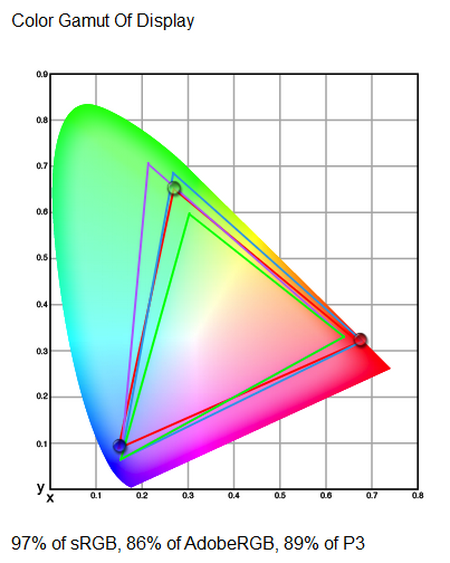
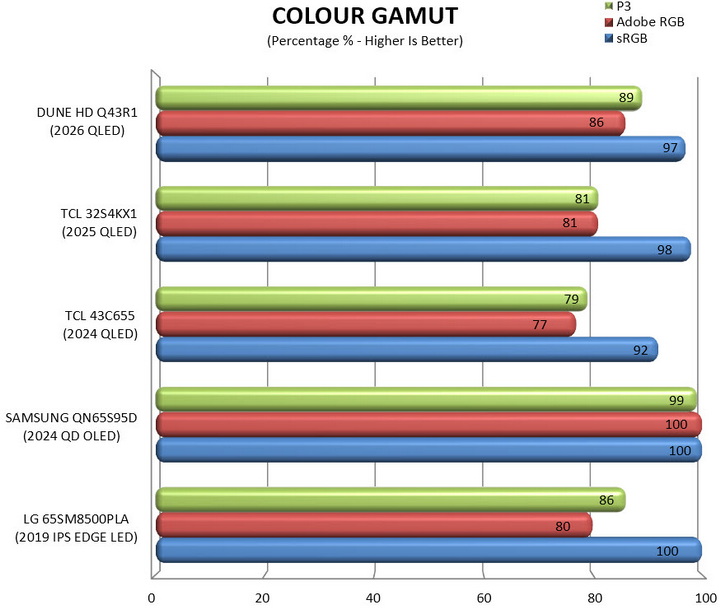
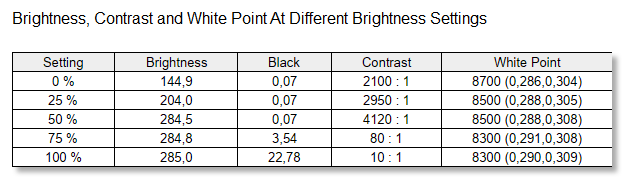
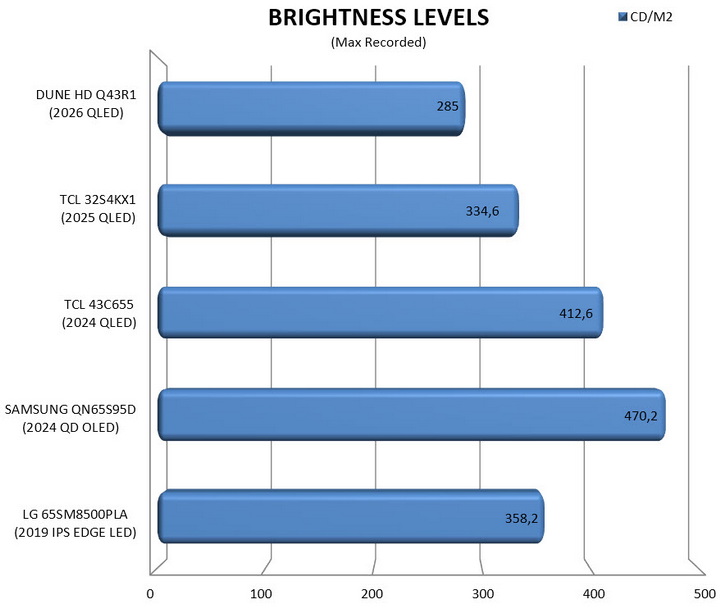
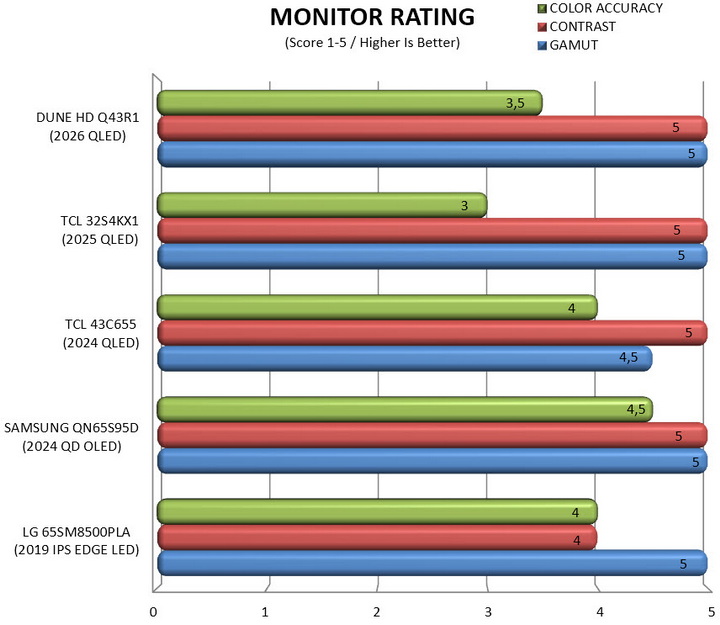
Each TV goes through a repeatable measurement cycle designed to capture both calibrated image performance and real‑world energy behavior. I begin with the SpyderPro by Datacolor, using it to establish a neutral baseline and then measure gamut coverage, peak and sustained brightness, and color accuracy across SDR and HDR modes under controlled lighting (TVs are connected to a laptop via HDMI v2.1). I also test screen uniformity across multiple brightness levels to identify luminance variance, color tinting, and edge‑to‑center deviations.
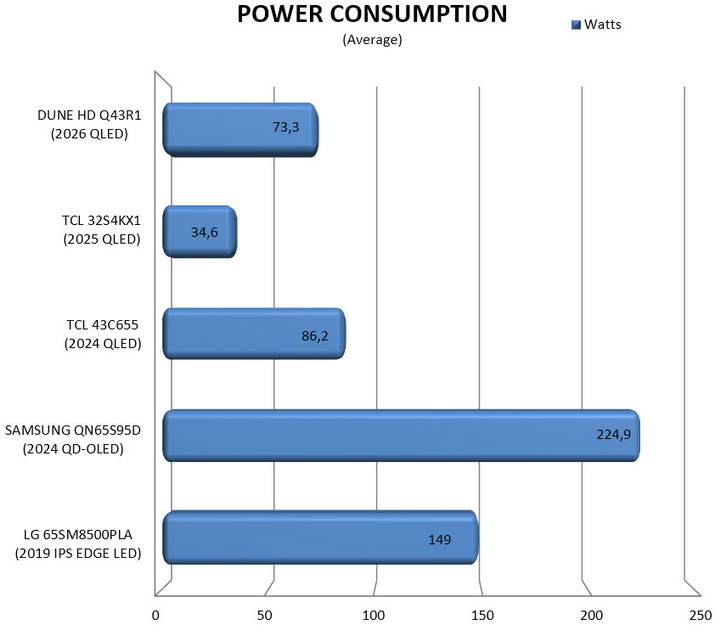
Once the panel is dialed in, I shift to power analysis by connecting the TV is to the AVM FRITZ!Smart Energy 210, which logs average consumption, peak draw, and standby behavior during mixed‑content playback, stress tests, and long‑form viewing. To keep these readings clean, the entire setup runs through an APC BR1500G‑GR Back‑UPS Pro, ensuring stable voltage and eliminating grid fluctuations that could skew results. This workflow produces a consistent, comparable dataset across panels, letting me evaluate each TV’s actual performance rather than the quirks of the room or the power line.
TEST RESULTS - GAMUT / BRIGHTNESS
TEST RESULTS – SCREEN UNIFORMITY / RATING / POWER CONSUMPTION

CONCLUSION
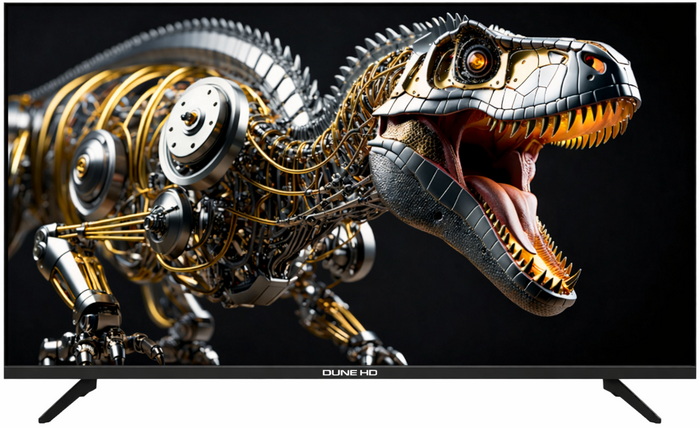
For a somewhat compact, low‑cost QLED, the Q43R1 by Dune HD delivers more than expected. The QLED VA panel delivers genuinely good picture quality for the price something which is backed by my SpyderPro measurements (stable color uniformity, respectable luminance consistency, and gamut coverage that sits comfortably in the “better than expected” bracket for a low cost QLED – take my Samsung QN65S95D results in the brightness chart with a grain of salt, still working on getting the maximum number reported by others). Pair that with the Dune HD media center, which remains one of the most capable local‑playback ecosystems available on any TV, and you get a device that handles formats and bitrates most mainstream platforms won’t even attempt. The value proposition is strong but not flawless. The absence of USB 3.0 port means that extremely high‑bitrate files can occasionally stutter (mostly during initial load), not because the decoder struggles, but because the port simply can’t feed data fast enough. The built‑in speakers are serviceable but flat, the remote’s directional pad has a tendency to mis‑register center presses as arrow inputs, and availability especially in the USA is limited enough that finding one can feel like a small quest. Still, if you can source it, the Dune HD Q43R1 offers a combination of picture quality, codec support, and price that’s hard to match.
Again, availability is the most important drawback of the Q43R1 by Dune HD since your best bet currently if you’re living in the USA is their official website (dune-hd.com – which has zero availability at this time) and if you’re living in the EU, their local online store (dune-shop.eu – with a price tag currently set at 299Euros). Honestly, I am somewhat conflicted when it comes to the Q43R1. On one hand Dune HD could had released something really unique (although I guess that at 43-inches it wouldn’t make much sense for that) but on the other hand it’s an affordable model that performs well and comes ready with their signature media center. Yes, it’s far from perfect but due to its overall performance I do suggest checking it out, it might just be what you’ve been looking for.
PROS
- Picture Quality
- Android, Whale OS & Dune HD Media Center
- Streaming Service Support
- Audio & Video Format Support
- Codec Support
- Low Power Consumption
- Price (For Some)
CONS
- Current Availability
- No USB 3.0 Port
- Audio Quality (Speakers)



